
Validation — Prove what your campaign actually drove in the real world.
The Attribution Report measures the incremental real-world impact of your campaign — independently, with a statistically matched control group that separates ad-driven visits from organic footfall. A number you can defend.
Trusted by 2,500+ clients across 26 markets.

Campaign impact, measured in real-world visits
Our Attribution Report measures the true incremental lift your ads delivered, separating real campaign impact from organic traffic and seasonal noise. See exactly which elements drove the strongest results: which specific audiences responded best, which creatives drove footfall to which store locations and the timings that triggered the visits.


Incremental Uplift
Proof that your campaign drove real results
The net increase in store visits directly caused by your campaign, measured alongside cost per incremental visitor. Know exactly what your managed media spend achieved and prove it to stakeholders with numbers that hold up.

Lift Drivers
What worked, what didn't, and what to do next
A breakdown of which creatives, placements, and campaign types contributed most to uplift, each scored by efficiency. Stop guessing what worked. See where to scale, what to maintain, and what to rethink before your next campaign launches.

Audience Insights
Who your campaign actually converted
A profile of who your campaign converted, broken down by gender, age, and purchasing power.
Sharpen your targeting, tailor your creative, and build higher-performing audiences for future campaigns.

Temporal Insights
When your ads drove the most visits
The days and hours that drove the highest conversion rates throughout your campaign.
Align ad scheduling with peak conversion windows and cut spend on time slots that don't deliver.

Top Locations
Where your campaign hit hardest
Your strongest-performing store locations and how far visitors travelled from home to convert.
Focus budget on the areas that convert best and refine geo-targeting with real distance-to-store data.
Have a campaign you need to defend? Walk through it on a real Attribution Report.
Book a demo
Client: Client: GrandVision
+56% Uplift in Store Visits
Spotify’s digital audio ads successfully drove real-world visits.
Read the case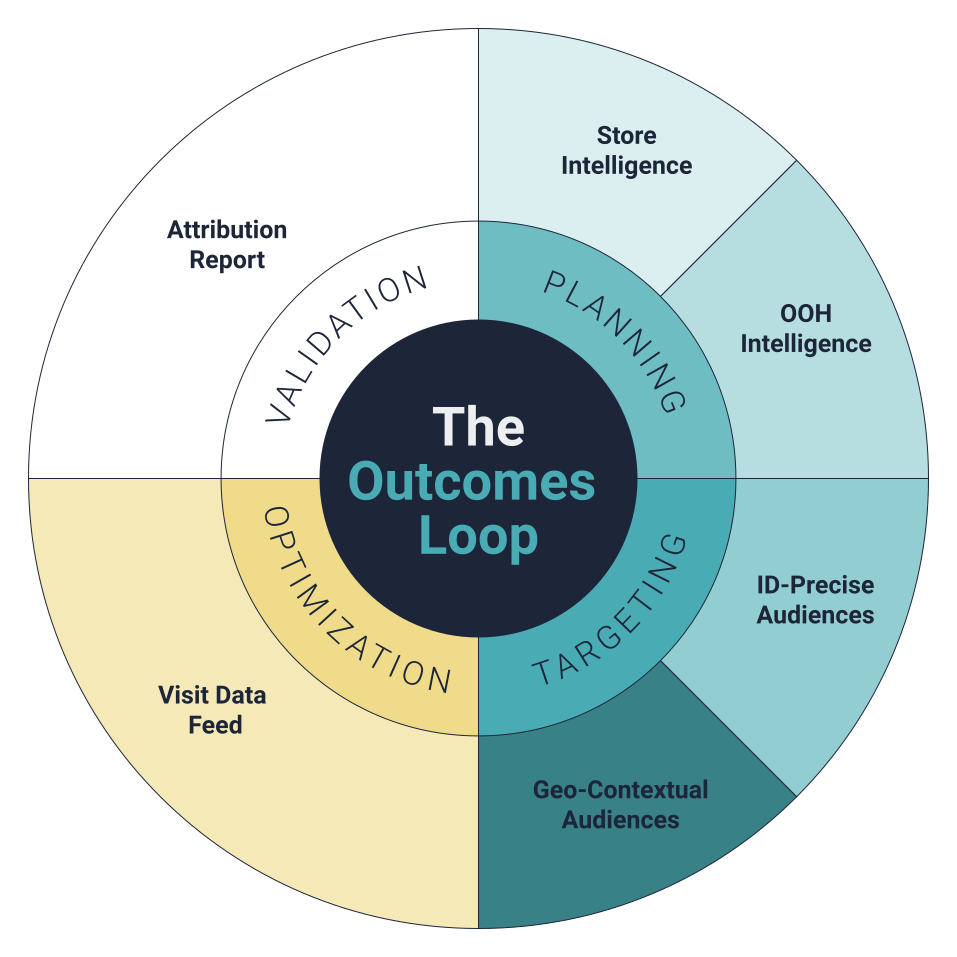
Resolved before the brief.
Why is the Net Visitation Uplift different from the visit count my DSP reports?
DSP‑native reporting counts all visits that happened during the campaign window. Net Visitation Uplift measures incremental visits — the visits that wouldn’t have happened without the campaign. A synthetic control condition estimates the baseline (what would have happened without ads); the difference between that baseline and the exposed group’s uplift is your net uplift.
How long does the Attribution Report take to deliver after a campaign closes?
After a campaign ends, there is a post-campaign window during which store visits can still occur as a result of the ads. The length of this window varies client-to-client. Once that window closes and all campaign data has been received and verified, generating the report itself takes around 48 hours. So the overall timeline depends mainly on two things: how long the post-campaign conversion window needs to be for your use case, and how quickly campaign data is provided.
Is the methodology independent of the media seller?
Yes. Adsquare's Validation workflow is commercially decoupled from the media side — Adsquare doesn't sell impressions, doesn't optimize bids, and doesn't earn on campaign spend. The Attribution Report is the same report whether you bought Adsquare Targeting, ran the campaign through a different vendor, or did both.
Can I export the report data for client decks or internal reporting?
Yes. The Attribution Report can be exported as a fully editable PPTX, which makes it easy for agency teams to reuse the Incremental visitors, Audience, Locations and Temporal insights in client decks and internal reports.
How does Validation connect back to Planning?
Validation first tells you how many incremental visitors your campaign generated — the extra store visits that wouldn’t have happened without advertising. It then breaks this down with detailed audience, location, and temporal insights about those incremental visitors: who they are, where they live, which locations performed best, and when they converted.
Planners and traders use these insights to refine the next Planning brief, tightening audience definitions and geo‑filters and focusing on the moments and places that drove the most uplift. This is the loop‑closing move: Validation isn’t the end of the campaign, it’s the input to the next one.
The brands that defend their numbers with Adsquare.


Close the loop. Then brief the next one.
In a working session we walk through an Attribution Report on a campaign you've already run — methodology, matched-control quality, the audience and locations that drove the lift. Validation's findings feed directly into the next Planning brief. The loop runs continuously.